
Download TheBloggingBuddha Chrome App – WordPress, Blogging, Free Courses
Overview
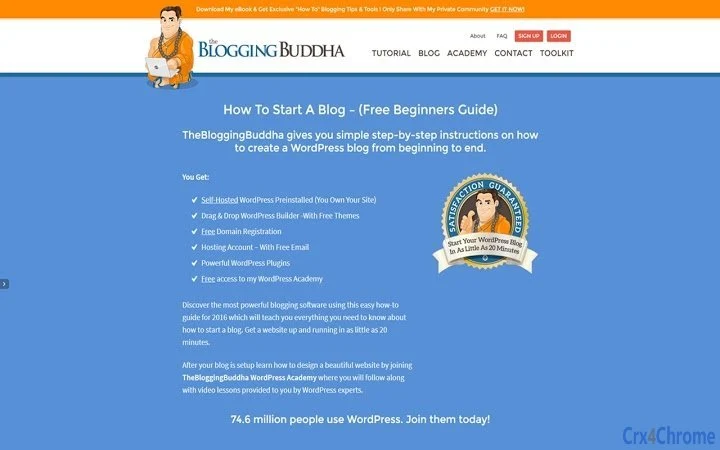
The TheBloggingBuddha Chrome Application is designed to streamline access to a comprehensive online learning platform focused on WordPress and blogging for beginners. Once installed, the app provides instant access to TheBloggingBuddha.com and, for users who have signed up and logged in, direct entry to the free WordPress Academy. This includes courses, lessons, video tutorials, slide presentations, and step-by-step guides aimed at helping new users create and manage a WordPress blog from scratch.
The software targets individuals starting their journey in online content creation, particularly those interested in launching a self-hosted WordPress website with minimal technical barriers. It serves as a convenient gateway to a structured learning environment that covers everything from domain registration to dashboard customization. Real-world usage includes setting up a personal blog, starting a digital business, or building a portfolio site using free tools and resources provided through the platform.
The developer, TheBloggingBuddha, positions itself as a dedicated educational resource for aspiring bloggers and WordPress users. The app is not a standalone content creation tool but rather a portal to a broader ecosystem of learning materials and services. The integration with the WordPress Academy suggests a focus on empowering users through education, enabling them to gain hands-on experience with real-world WordPress functionality.
Key Features & Capabilities
- Instant Access to TheBloggingBuddha.com – The app serves as a dedicated shortcut to the main website, eliminating the need to open a browser tab and navigate through menus.
- Seamless Login Integration – Users who have previously signed up and are logged in can access their WordPress Academy account directly from the app.
- Access to Free Courses and Lessons – The app provides entry to a library of beginner-friendly content, including video tutorials, slide decks, and written guides.
- Step-by-Step WordPress Setup Guide – The platform offers structured instruction on creating a self-hosted WordPress blog, from initial setup to publishing content.
- Resource Hub Access – Users gain access to free tools such as themes, plugins, email accounts, and domain registration, all integrated within the learning ecosystem.
- Interactive Dashboard Tutorials – The platform includes visual and voice-guided walkthroughs built directly into the WordPress dashboard for real-time learning.
These features are particularly beneficial for users who prefer a focused, distraction-free learning environment. The drag-and-drop builder access and free themes allow beginners to experiment with site design without coding knowledge. The app’s role as a content delivery and navigation tool enhances the usability of the broader WordPress Academy, making it easier for new users to stay on track with their learning goals.
User Interface, Workflow & Performance
The user interface of the TheBloggingBuddha Chrome Application is designed to be minimal and functional, aligning with standard Chrome App conventions. The layout is streamlined, featuring a clean browser window with navigation elements focused on the core website and user account access. Users can expect a simple workflow: install the app, launch it, and be redirected to the main site or their Academy dashboard if logged in.
Navigation is intuitive, relying on familiar web-based interactions. The app does not include independent editing or publishing tools but functions as a launchpad for external content. Workflow efficiency is enhanced by eliminating the need to open a browser and type a URL, reducing friction for repeated access to learning materials.
The developer did not specify resource usage details. Performance observations are based on general software behavior patterns. The app is expected to operate with low CPU and RAM consumption typical of lightweight browser-based applications. Stability is likely consistent with Chrome’s standard app performance, though exact behavior may vary depending on system configuration and internet connectivity.
Compatibility & System Requirements
The TheBloggingBuddha Chrome Application is compatible with both Windows and Mac operating systems. It is designed to run on modern desktop environments that support Chrome Apps, which may include systems with updated versions of Windows 10 or later and macOS 10.15 or later.
The installation size is 15.4 MB, indicating a lightweight footprint. The developer did not provide additional system requirements. Exact hardware specifications such as minimum RAM, processor speed, or storage space were not listed. Compatibility information was partially provided, with no details on older OS versions or specific hardware configurations.
Pros and Cons
Pros
- Free access to comprehensive WordPress and blogging education
- Instant launch via Chrome App for quick access to learning resources
- Seamless integration with the WordPress Academy for logged-in users
- Lightweight installation at just 15.4 MB
- Access to free tools including hosting, domain, email, themes, and plugins
- Structured step-by-step guides ideal for absolute beginners
Cons
- Functionality is limited to web navigation and does not include standalone tools
- Requires an active internet connection for full access to content
- No offline mode or downloadable course materials specified
- Dependent on Chrome App support, which is being phased out by Google
- Exact system requirements were not listed
FAQ Section
Is TheBloggingBuddha Chrome App available for all devices?
The app is compatible with Windows and Mac systems that support Chrome Apps. Availability may be limited on devices without Chrome or updated operating systems.
Is the app secure to use?
The app accesses TheBloggingBuddha.com through standard HTTPS encryption. Users should ensure they are using a secure internet connection when logging in or accessing personal data.
Can I use the app without an account?
Yes, the app can be used to browse the main website. However, full access to courses, lessons, and the WordPress Academy requires a registered account and login.
Does the app require updates?
As a Chrome App, it may receive automatic updates through the Chrome browser. Users should keep their browser and operating system up to date for optimal performance.
Is the app free to download and use?
Yes, the app is available at no cost. All core features, including access to free courses, themes, plugins, and hosting resources, are provided without charge.
Final Thoughts + CTA
The TheBloggingBuddha Chrome Application offers a focused, beginner-friendly entry point into the world of WordPress and blogging. While it does not function as a standalone content creation tool, its strength lies in delivering structured, high-quality educational content directly to users through a convenient interface. The integration with the free WordPress Academy, combined with access to essential tools like free hosting, domains, and plugins, makes it a compelling choice for those starting their online journey.
Despite limitations such as dependency on Chrome App support and lack of offline functionality, the app remains a valuable resource for new users seeking a clear, step-by-step path to building a WordPress blog. Its lightweight design and free access further enhance its appeal. For anyone exploring WordPress for the first time, this app provides a practical and accessible starting point.
Download TheBloggingBuddha Chrome App now and begin your journey to building a professional WordPress website with confidence.







